Effect Tracking
Monitor effect execution with start, emit, complete, and error events.
How it works
Effect tracking is powered by DevToolsEffectSources, which extends NgRx's EffectSources class to instrument effects at registration time.
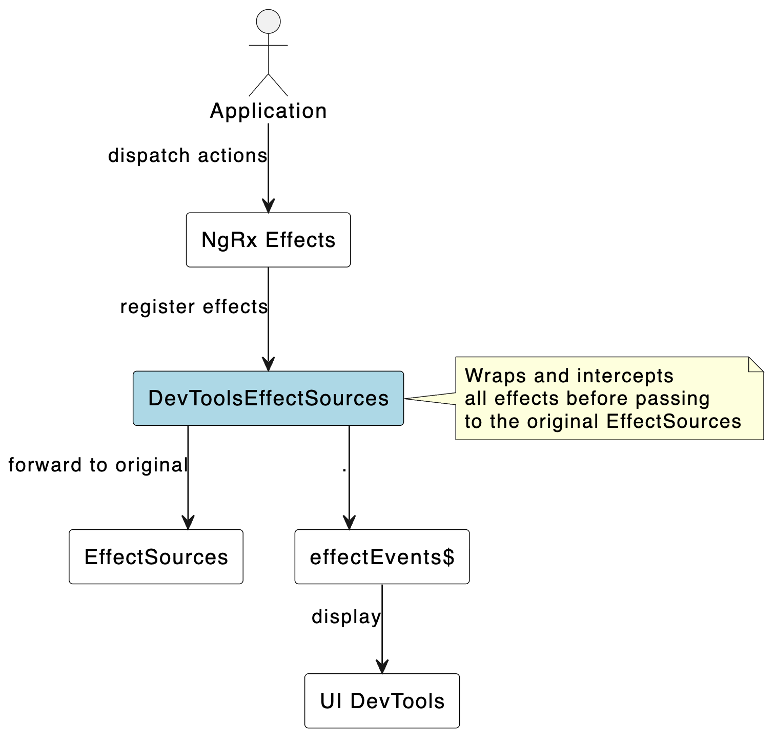
Implementation details
- Effect Registration Override -
DevToolsEffectSourcesoverridesaddEffects()to intercept effect classes when registered. - Metadata Extraction - Effect properties are identified by the
__@ngrx/effects_create__metadata key fromcreateEffect(). - Observable Instrumentation - Each effect's observable is wrapped with
tap()to capture emissions and errors. - Lifecycle Events - Events are emitted for:
emitted(action dispatched),executed(non-dispatch effect),error. - Duration Calculation - Time is tracked between emissions to calculate effect duration.
- ReplaySubject Buffer - Events are buffered in a ReplaySubject (100 items) for late subscribers.
Effect states
| State | Description |
|---|---|
| Started | Effect has begun execution |
| Emitted | Effect has dispatched an action |
| Completed | Effect has finished successfully |
| Error | Effect encountered an error |
Effects panel
The dedicated Effects Panel shows all effect executions with:
- Effect name and class
- Duration of execution
- Current status
- Actions emitted
- Error details (if any)
warning
provideEffects() must be called before provideNgrxDevTool() so effects are registered before the DevTool instruments them.
Configuration
Ensure effect tracking is enabled:
provideNgrxDevTool({
  trackEffects: true
})