Action Monitoring
Track all dispatched actions as they happen in your application.
How it works
The DevTool uses a meta-reducer and Actions stream interception to capture every action dispatched to your store.
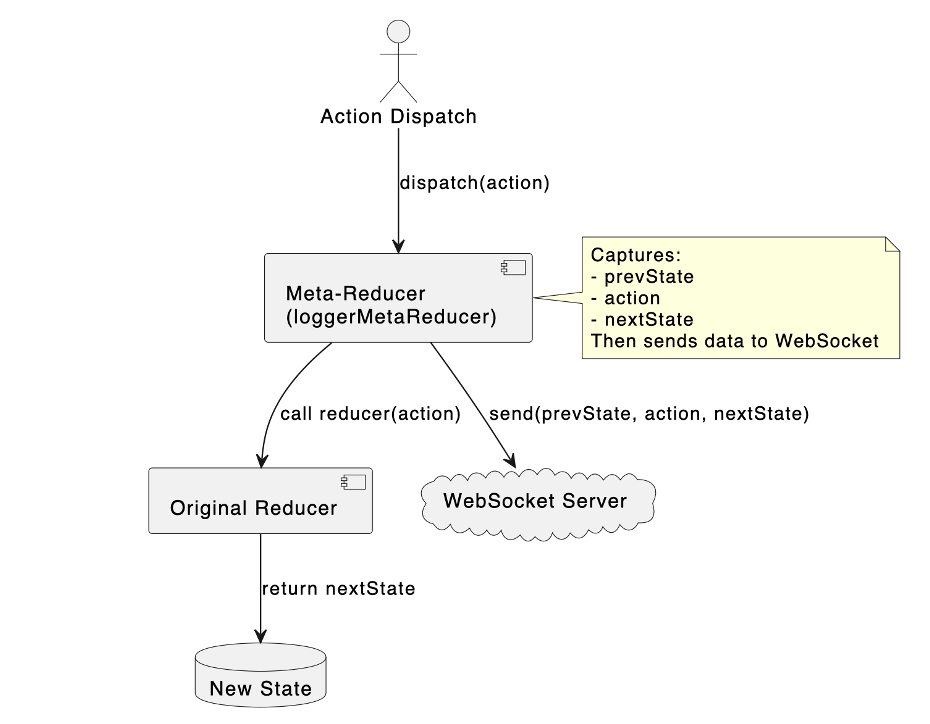
Implementation details
- Meta-Reducer Wrapping -
createDevToolMetaReducer()wraps your reducers and captures the previous and next state for every action. - Actions Stream Subscription -
ActionsInterceptorServicesubscribes to NgRx'sActionsobservable to intercept all dispatched actions. - Effect Correlation - The
EffectTrackerServicedetermines if an action was user-dispatched or emitted by an effect using pattern matching. - WebSocket Broadcast - Action data (type, payload, timestamp, effect correlation) is sent to the DevTool UI via WebSocket on port 4000.
- Message Buffering - If the WebSocket isn't connected yet, messages are buffered and flushed when the connection opens.
Visual indicators
| Indicator | Meaning |
|---|---|
| Blue border | User action - dispatched directly from a component or service |
| Orange border | Effect result - emitted by an effect in response to another action |
Action details
Click on any action to view:
- Action type and payload
- Timestamp of dispatch
- Source effect (if applicable)
- State before and after